
AI Image Prompting for Business: Why 'Make It Professional' Doesn't Work
Image AI doesn't understand adjectives like 'professional.' It renders scene descriptions. Here's how to stop regenerating and start directing.
You’re typing “professional headshot, modern office, natural lighting” into your AI image tool for the fourth time, and it keeps giving you corporate stock photo hell. Different bad results every time, but consistently bad.
Here’s what’s happening: you’re describing what you want with adjectives instead of what the camera sees with nouns and verbs. Image AI doesn’t interpret vibes. It renders scenes. It’s a film crew waiting for direction, not a mind reader trying to guess what “professional” means to you.
The shift is from tagging (adjective-based labels) to directing (verb-based scenes). Stop telling the AI what category you want. Start describing what the camera sees.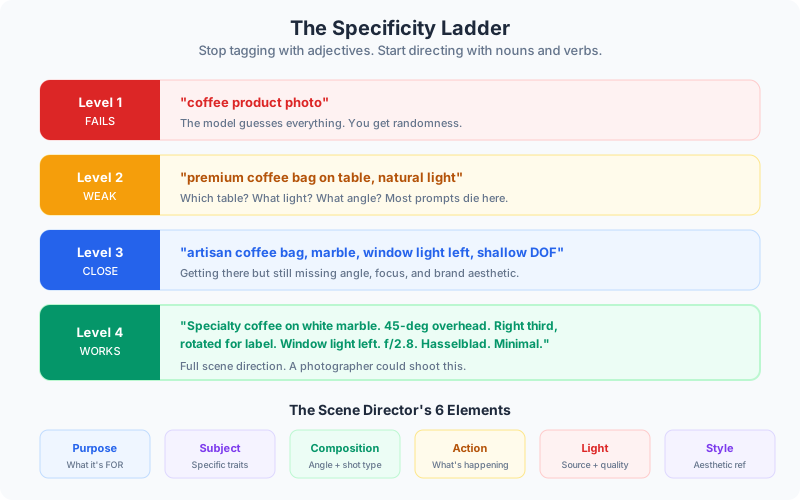
The Scene Director’s Framework
Every workable prompt needs six elements. Miss one and you’re gambling on defaults — and the defaults are generic stock photo territory.
Purpose — What this image is FOR. LinkedIn profile, ad creative, pitch deck, blog header. Different contexts need different compositions, and the model uses this to make hundreds of micro-decisions.
Subject — Specific characteristics, not categories. Not “a woman” but “a confident CFO in her 50s wearing a tailored charcoal blazer.”
Composition — Camera angle, shot type, lens effect. Eye level or low angle? Close-up or wide? Shallow depth of field or everything sharp?
Action — What’s happening right now, present tense. “Executive presents to board members” beats “confident leader” every time.
Location and Light — Natural window light from the left is different from overhead fluorescents. Golden hour exterior is different from studio lighting. Be specific about source and quality.
Style — Aesthetic reference and medium. “Shot on Fuji Pro 400H film” gives different color science than “shot on Sony a7R IV.” These references anchor the model’s output.
Compare These Two Prompts
“Professional headshot” gives you randomness.
“Headshot for financial services executive. Man, 40s, salt-and-pepper hair, navy suit, white shirt, no tie. Medium close-up, eye level, looking directly at camera with slight smile. Soft natural light from camera left creating gentle shadow on right side of face. Modern office background visible but out of focus at f/2.8. Shot on Canon 5D Mark IV with 85mm lens. Editorial portrait style, professional but approachable.”
That second one gives you control. Another person could read it and picture the same image — and that’s the test.
👉 Tip: Mental test for every prompt — if you handed it to a photographer, could they shoot it? If not, keep specifying.
The Specificity Ladder
Most prompts die at level 2 of four levels.
Level 1 (fails): “coffee product photo” — the model guesses everything.
Level 2 (weak): “premium coffee bag on table, natural light” — which table? What light? What angle?
Level 3 (getting there): “artisan coffee bag on marble surface, soft natural window light from left, shallow depth of field” — but still missing angle, focus point, and brand aesthetic.
Level 4 (works): “Product photo of specialty coffee bag on white marble countertop. Overhead shot at 45-degree angle. Bag in right third, slightly rotated to show front label. Soft natural light from large window camera left. Three coffee beans scattered artfully. Shallow depth of field at f/2.8. Hasselblad aesthetic. Clean, minimal, editorial.”
The jump from level 2 to level 4 is where most teams lose 80% of their iteration cycles. You’re not being “picky” by specifying — you’re being efficient.
Closing the Specification Gap
Abstract business requirements don’t map to pixels. You have to translate.
“Premium” becomes:
- Materials: marble, brass, dark wood, textured fabric
- Lighting: soft and diffused, dramatic side light, golden hour
- Space: minimal and clean, layered and rich, architectural
“Modern” becomes:
- Era: mid-century, contemporary minimalist, 2020s tech aesthetic
- Design movement: Scandinavian, Japanese minimalism, Bauhaus
- Color palette: monochrome with accent, earth tones, high contrast
“Professional” becomes:
- Industry context: finance = conservative, tech = casual, creative = expressive
- Role: C-suite = tailored and polished, IC = competent and approachable
- Platform: LinkedIn = direct engagement, website = environmental context
The path from “make it look premium” to “soft window light on matte black surface with brass accents, shot from slightly above at 30 degrees” is where the real skill lives.
Working with Text and Infographics
Modern models render text well. This unlocks infographics, diagrams, and data visualization directly from prompts. Specify text in quotes — “Overlay the headline ‘Cut Costs by 40%’ in bold sans-serif at the top third” — and define the aesthetic: polished editorial, technical diagram, or hand-drawn whiteboard.
For technical diagrams, use architectural language: “Create an orthographic system architecture diagram showing data flow between three services. Label ‘API Gateway,’ ‘Processing Engine,’ and ‘Data Lake’ in technical sans-serif with clean connection lines.”
Character Consistency Across Campaigns
Reference images allow identity locking — placing a specific person into new scenarios without facial distortion. For multi-image campaigns: “Create a 6-part case study visual series featuring this client success manager. Appearance and attire must stay consistent. Different meeting contexts. Generate images one at a time.”
That last instruction — “one at a time” — matters. Batch generation drifts. Sequential generation with identity locking holds.
👉 Tip: Build a reusable scene library. Save your best prompts as templates. Swap subjects and details but keep the proven structure. One good headshot prompt template saves you hours across an entire team page.
Advanced Editing Without Masking
You don’t need Photoshop for complex edits. Modern models handle conversational editing:
- “Remove the competitor’s logo on the whiteboard. Fill with generic business diagrams.”
- “Change only the conference table to walnut.”
- “Replace the laptop screen with our dashboard mockup.”
- “Update this Q3 image to Q4. Keep people and composition identical. Add autumn colors and light sweaters.”
If an image is 80% correct, don’t regenerate from scratch. Ask for the specific change. The model understands conversational edits. Use them.
The Meta-Pattern
This isn’t just about images. It’s about learning to specify rather than intend.
The specification gap shows up everywhere: design feedback, technical requirements, creative briefs, project scopes. The person who can translate abstract goals into observable, executable details gets what they want faster, iterates less, and compounds their creative velocity.
Image AI just makes the gap visible. You type adjectives, you get randomness. You type observations, you get control. The businesses that close the specification gap first — that build scene libraries, document their visual language, and train teams to direct instead of describe — get 10x creative velocity while competitors are still regenerating.
Benefits of a scene-directing approach:
- 70-80% fewer regeneration cycles per asset
- Consistent brand imagery across team members
- Reusable templates that scale creative output
- Better communication skills that transfer to every brief and spec you write
Continue reading:
- The 11 AI Primitives — Image generation is one primitive. Here are the other ten.
- How to Implement AI in Your Business — Where image prompting fits in the broader AI adoption picture
- How to Write a Procedure — The same specification skills applied to documenting workflows
Related AI Articles
Which of These 4 AI Adoption Profiles Is Holding Your Company Back?
Most companies stall at the same AI adoption stage. A framework for finding where you are, why you're stuck, and what actually moves you forward.
Read moreThe AEC Firm's Guide to Recovering 30% of Lost Billable Hours
A practical how-to for architecture and engineering firms that want to stop losing billable capacity to proposals, RFIs, spec coordination, and reporting.
Read moreWhat Your Senior Accountants Wish You Knew About AI
Most AI-for-accounting pitches miss the point. Here's what matters and the myths keeping firms from recovering senior capacity.
Read moreHow a Mid-Size GC Cut Bid Prep Time by 60% Without Adding Estimators
How one general contractor used AI to fix estimating bottlenecks, catch cost overruns weeks earlier, and stop losing tribal knowledge to turnover.
Read more