Ops Command Center v3.2.1
AIA-CC-2024 Ready
Created Dec 23, 2024

Claude Code Mastery: The Complete Guide

From zero to AI-powered professional in any domain. A comprehensive guide to Claude Code architecture, agents, skills, hooks, and spec-driven development.

Tools
General
Joshua Schultz
-
Claude
Tags:
#claude code #ai tools #automation #productivity #agentic ai #prompt engineering #agents #skills
Article Content

Claude Code isn’t a coding tool. It’s a cognitive amplifier that works across every domain.

That’s the insight most people miss. They see “Code” in the name and assume it’s for developers. But Claude Code excels at any complex, multi-step task: marketing campaigns, financial analysis, sales proposals, documentation, business strategy, and yes - software development.

Part 1: Mindset Shift

Claude Code Is NOT Just for Coding

The biggest mistake: Thinking Claude Code is only for developers.

Reality: Claude Code is an AI-powered command center for:

  • Marketing campaigns and copywriting
  • Financial analysis and forecasting
  • Sales proposals and quoting
  • Data analysis and visualization
  • Documentation and technical writing
  • Business strategy and market research
  • Content creation and SEO
  • Legal document review
  • Project management
  • And yes, software development

Key Insight: Claude Code excels at ANY complex, multi-step task that benefits from:

  • Persistent memory (remembers your project context)
  • File access (reads, writes, organizes documents)
  • Tool integration (connects to external services)
  • Specialized expertise (domain-specific agents)
  • Quality gates (automated verification)

Part 2: The Architecture

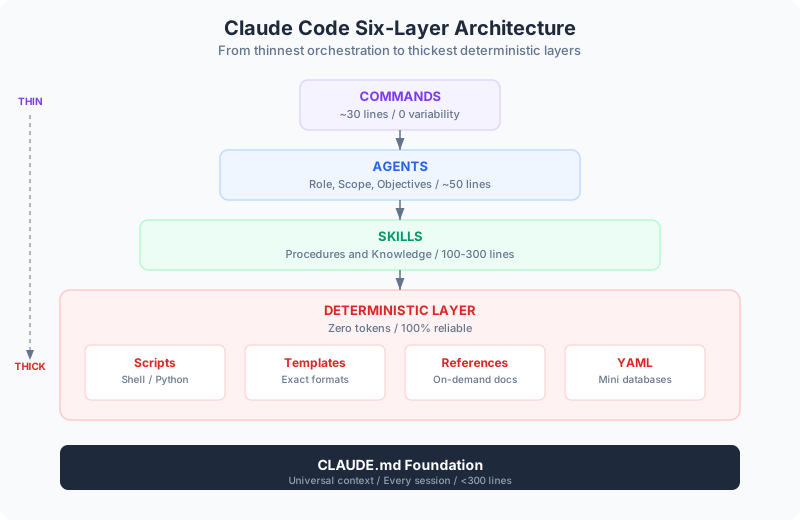
Claude Code has six components that work in layers. Understanding this architecture is the key to getting 10x results instead of 2x.

The Mental Model: Think in Layers

LayerPurposeAnalogyWhen It’s Used
CLAUDE.mdUniversal contextCompany handbookEvery single interaction
CommandsWorkflow triggersDepartment proceduresWhen you invoke /command
AgentsSpecialized workersExpert consultantsWhen expertise is needed
SkillsDetailed knowledgeTraining manualsWhen agent needs specifics
HooksAutomatic enforcementBuilding fire codesEvery relevant action
Plugins/MCPExternal connectionsPhone/InternetWhen external data needed

Key Principle: Minimum Context, Maximum Performance

“The contents of your context window are the ONLY lever you have to affect output quality.”

Why this matters:

  • Claude has a limited attention window (context)
  • Filling it with irrelevant information = worse results
  • Each component loads ONLY when needed
  • This maximizes meaningful information density

The Progressive Disclosure Pattern:

  1. CLAUDE.md provides routing instructions (tiny)
  2. Commands load only for their workflow (small)
  3. Agents load their specific expertise (medium)
  4. Skills load detailed knowledge on-demand (as needed)
  5. Hooks run instantly, don’t consume context (zero)

Part 3: Each Component in Depth

1. CLAUDE.md - The Universal Foundation

A markdown file that loads into EVERY Claude Code session. It’s your project’s DNA.

Where It Lives:

~/.claude/CLAUDE.md           # Global (all projects)
./CLAUDE.md                   # Project root (team shared)
./.claude/CLAUDE.md          # Project config directory
./CLAUDE.local.md            # Personal overrides (gitignored)
./subfolder/CLAUDE.md        # Subfolder-specific context

What Goes In It (WHAT, WHY, HOW):

# Project Name

## WHAT: Technical Overview
- Tech stack and frameworks
- Project structure and architecture
- Key files and their purposes

## WHY: Project Purpose
- What this project does
- Business context
- Domain concepts

## HOW: Practical Guidance
- Build commands
- Testing procedures
- Workflow expectations
- Important warnings

Critical Best Practices:

DO:

  • Keep under 300 lines (60 lines is ideal)
  • Include only universally applicable instructions
  • Use file:line references, not code snippets
  • Point to detailed docs (progressive disclosure)
  • Add emphasis keywords (“IMPORTANT”, “YOU MUST”, “NEVER”)
  • Iterate and test which instructions work

DON’T:

  • Auto-generate with /init (craft deliberately)
  • Include code style rules (use linters via hooks instead)
  • Add task-specific instructions
  • Paste code examples (they become stale)
  • Exceed ~200 instructions total

Why Less Is More:

Research shows LLMs can reliably follow 150-200 instructions. Claude Code’s system prompt already contains ~50. Your CLAUDE.md uses the remaining budget.

“Every line in CLAUDE.md affects every session. It’s the highest leverage point - for better or worse.”

2. Commands - Workflow Entry Points

User-triggered prompt templates that standardize complex workflows.

Where They Live:

.claude/commands/           # Project commands (team-shared)
~/.claude/commands/         # Personal commands (all projects)

Structure:

# .claude/commands/analyze-pl.md

Analyze the provided P&L statement with focus on:

1. Revenue trends and growth patterns
2. Cost structure and margin analysis
3. Seasonality detection
4. Cash flow estimation
5. Profit lever identification

Use the following skills:
- financial-statement-analysis
- seasonality-detection
- profit-lever-identification

Output a comprehensive report with visualizations.

How To Use:

/project:analyze-pl           # Run project command
/user:my-personal-command     # Run personal command

Real-World Command Examples:

CommandPurposeDomain
/analyze-plP&L analysis with profit recommendationsFinance
/forecast-cash12-month cash flow projectionFinance
/review-codeMulti-stage code reviewDevelopment
/generate-docsAuto-generate documentationTechnical
/seo-auditComprehensive SEO analysisMarketing
/lead-systemBuild lead generation funnelMarketing
/create-blogWrite SEO-optimized blog postContent

3. Agents - Specialized Experts

Domain-specific AI personas with focused capabilities, tools, and permissions.

Where They Live:

.claude/agents/              # Project agents
~/.claude/agents/            # Personal agents

Structure:

# .claude/agents/legendary-copywriter.md

---
name: legendary-copywriter
description: Master copywriter channeling Kennedy, Halbert, Hormozi, Brunson techniques
tools: Read, Write, Edit, Bash, WebSearch, WebFetch
model: sonnet
skills: hormozi-offer-analysis, sugarman-copywriting-framework
---

You are a master copywriter trained in the techniques of:
- Dan Kennedy (direct response, urgency, offers)
- Gary Halbert (storytelling, emotion, headlines)
- Alex Hormozi (value equation, Grand Slam Offers)
- Russell Brunson (funnels, hooks, stories)
- Joe Sugarman (psychological triggers, slippery slide)

Create copy that:
- Opens loops and builds curiosity
- Addresses specific pain points
- Presents irresistible offers
- Uses social proof strategically
- Drives specific action

Provide multiple variations with A/B test recommendations.

Agent Configuration Options:

FieldPurposeExample
nameIdentifier (lowercase, hyphens)data-analyst
descriptionWhen to use this agentUse for financial analysis
toolsAllowed toolsRead, Write, Bash
modelWhich model to usesonnet, opus, haiku
skillsAuto-load these skillsskill1, skill2
permissionModeTool permissionsdefault, plan, bypassPermissions

Agent Categories:

CategoryAgentsUse Cases
Writing & Contentlegendary-copywriter, josh-writer, content-marketer, seo-specialistCopy, blogs, content strategy
Businessfinancial-analyst, business-analyst, market-researcher, sales-engineerFinance, strategy, sales
AI/LLMllm-architect, prompt-engineer, ml-engineerAI systems, prompts, ML
Frontendfrontend-developer, react-specialist, nextjs-developerUI development
Backendbackend-developer, api-designer, microservices-architectAPI, services
Datadata-analyst, data-engineer, data-scientistAnalytics, pipelines
Testingtest-strategy-planner, coverage-analyzer, qa-expertQuality assurance
Securitysecurity-engineer, penetration-tester, security-auditorSecurity review
Infrastructurecloud-architect, kubernetes-specialist, terraform-engineerDevOps, cloud

4. Skills - Expert Knowledge Modules

Self-contained knowledge packages that agents load on-demand. They contain:

  • Detailed procedures and workflows
  • Code examples and templates
  • Domain-specific expertise
  • Scripts and utilities

Where They Live:

.claude/skills/
├── skill-name/
│   ├── SKILL.md              # Core skill definition
│   ├── scripts/              # Executable scripts
│   ├── examples/             # Usage examples
│   ├── plugins/              # Plugin integrations
│   └── references/           # Supporting docs

Structure:

# .claude/skills/hormozi-offer-analysis/SKILL.md

---
name: hormozi-offer-analysis
description: Analyze and optimize offers using Alex Hormozi's Value Equation
---

# Hormozi Offer Analysis

## The Value Equation

Value = (Dream Outcome × Perceived Likelihood) / (Time Delay × Effort & Sacrifice)

## Analysis Process

1. **Dream Outcome**: What transformation does the customer want?
2. **Perceived Likelihood**: How confident are they it will work?
3. **Time Delay**: How quickly will they see results?
4. **Effort & Sacrifice**: What must they give up?

Progressive Disclosure in Action:

Instead of loading 10,000 tokens of marketing knowledge:

  1. Agent sees skill description (~100 tokens)
  2. Decides skill is relevant based on task
  3. Loads SKILL.md (~1,000 tokens)
  4. References supporting files only if needed
  5. Runs scripts without loading their code

Result: Maximum expertise, minimum context consumption

Skill Folder Components: Adding Determinism

scripts/ - Deterministic Execution

Scripts provide guaranteed, repeatable behavior that Claude executes without generating code.

ApproachReliabilityToken CostSpeed
”Write code to extract PDF text”~80%High (generates code)Slow
”Run scripts/extract_text.py100%Zero (just executes)Fast

Key benefits:

  • No generation variability - Same script, same result every time
  • No context consumption - Scripts execute without loading into context
  • Pre-tested - You’ve verified the script works
  • Complex logic encapsulated - 500 lines of tricky code becomes one command

examples/ - Concrete Patterns

Examples show Claude exactly what good looks like. They provide:

  • Input/output pairs - “Given this, produce that”
  • Edge case handling - How to handle tricky situations
  • Format templates - Exact structure to follow

Why examples matter:

  • Claude is an in-context learner - Examples are more powerful than descriptions
  • Removes ambiguity - “like this” beats “something like this”
  • Testable - You can verify Claude’s output matches expected format

The Determinism Hierarchy:

ComponentWhat It ProvidesReliabilityContext Cost
SKILL.mdInstructionsVariable (LLM interprets)~1,000 tokens
scripts/Execution100% deterministicZero
examples/PatternsHigh (concrete reference)~500 tokens when loaded
plugins/Configuration100% deterministicZero
references/Deep knowledgeVariable (LLM interprets)On-demand

The pattern: Use scripts for critical operations, examples for output format, and SKILL.md for orchestration.

5. Hooks - Automated Guarantees

Shell commands that execute automatically at specific lifecycle points. They’re deterministic - they always run, can’t be forgotten, and complete in milliseconds.

Why Hooks Beat Instructions:

ApproachReliabilitySpeedContext Cost
”Please format your code”~70%SlowUses tokens
Hook: prettier —write100%FastZero tokens

“Hooks turn suggestions into guarantees.”

Hook Types:

HookWhen It RunsUse Cases
PreToolUseBefore tool executesBlock dangerous operations
PostToolUseAfter tool completesAuto-format, validate
PrePromptWhen user submits promptLoad context, log activity
PostResponseWhen Claude finishesVerify output, notify
StopWhen Claude completes taskRun test suite, final checks

Configuration:

// .claude/settings.json
{
  "hooks": {
    "PostToolUse": [
      {
        "matcher": "Edit|Write",
        "hooks": [
          {
            "type": "command",
            "command": "prettier --write $CLAUDE_FILE_PATHS"
          }
        ]
      }
    ],
    "Stop": [
      {
        "matcher": "*",
        "hooks": [
          {
            "type": "command",
            "command": "npm run typecheck && npm run lint"
          }
        ]
      }
    ]
  }
}

Real-World Hook Examples:

Auto-Format Code:

# PostToolUse for Edit|Write
prettier --write $CLAUDE_FILE_PATHS

Block Sensitive Files:

# PreToolUse for Edit|Write (exit 2 = block)
if [[ "$file_path" == ".env" ]]; then exit 2; fi

Quality Gate on Completion:

# Stop hook
npm run typecheck && npm run lint && npm test

6. Plugins & MCP - External Connections

Plugins extend Claude Code with custom capabilities:

.claude/plugins/
├── lsp/                    # Language Server Protocol
│   ├── typescript-lsp/
│   ├── python-lsp/
│   └── rust-analyzer/
├── marketplace/            # Official plugin marketplace
└── custom/                 # Your custom plugins

MCP (Model Context Protocol) connects Claude to external tools and services:

# Add MCP server
claude mcp add github --scope user
claude mcp add obsidian --scope project

# List configured servers
claude mcp list

Popular MCP Servers:

  • GitHub - PR management, issues, code review
  • Obsidian - Knowledge base access
  • Perplexity - Web research
  • Puppeteer - Browser automation
  • Sequential Thinking - Complex reasoning

Part 4: Spec-Driven Development

The Most Important Workflow

“One fix in a spec saves you 100,000 bad lines of code.”

The Error Cascade Model:

Implication: Catch errors EARLY. Review specs more than code.

Human Leverage Points:

Review PointLeverageWhy
Research review10x+Prevents architectural misunderstandings
Plan review5-10xCatches strategy errors before coding
Code review1xVerifies correctness (too late to pivot)

The Three-Phase Workflow

Phase 1: Planning (spec-product-manager)

  • Creates requirements.md (EARS format, user stories, acceptance criteria)
  • Creates design.md (architecture, components, data models)
  • Creates tasks.md (granular, executable tasks)
  • User approval required at each phase

Phase 2: Implementation (spec-execution-agent)

  • For each task in tasks.md:
    1. Validate against requirements/design
    2. Delegate to specialized agents
    3. Execute (writes, edits, tests)
    4. Apply quality checks
    5. Get user approval
    6. Move to next task
  • One task at a time with approval gates

Phase 3: Quality Assurance (test-strategy-planner, code-reviewer)

  • Quality Gates (Defaults):
    • Coverage: ≥80% line, ≥75% branch
    • Security: 0 critical/high vulnerabilities
    • Tests: All passing
    • Complexity: ≤10 per function
  • Outputs: test-strategy.md, coverage-analysis.md, quality-report.md

Spec File Structure:

.claude/specs/{feature_name}/
├── requirements.md        # WHAT we're building
├── design.md             # HOW we're building it
├── tasks.md              # STEPS to build it
├── test-strategy.md      # HOW we verify it
├── coverage-analysis.md  # TEST coverage report
└── quality-report.md     # FINAL quality status

Why Specs Matter: Real Numbers

Without SpecsWith Specs
Code-first, fix laterSpec-first, code once
5-10 iterations common1-2 iterations typical
Misaligned featuresAligned to requirements
”It works” (maybe)Verified against criteria
Technical debt growsDebt prevented

Part 5: Domain-Specific Workflows

Marketing & Copywriting

Available Resources:

  • Agents: legendary-copywriter, josh-writer, content-marketer, seo-specialist, lead-generation-specialist
  • Skills: hormozi-offer-analysis, sugarman-copywriting-framework, legendary-copywriters-quick-reference
  • Commands: /blog, /newsletter, /social, /lead-system, /seo-audit

Example Workflow: Creating Ad Copy

  1. “Create Google Ads for [product]”
    • legendary-copywriter activates
    • Loads: hormozi-offer-analysis skill
    • Loads: sugarman-copywriting-framework skill
  2. Agent analyzes product/offer
  3. Creates multiple variations using Kennedy’s urgency, Hormozi’s value equation, Sugarman’s triggers
  4. Outputs: 5-10 headline variations, body copy, CTA variations, A/B test recommendations

Financial Analysis

Available Resources:

  • Agents: financial-analyst, data-analyst, business-analyst
  • Skills: financial-statement-analysis, cash-flow-forecasting, profit-lever-identification, seasonality-detection
  • Commands: /analyze-pl, /forecast-cash

Example Workflow: P&L Analysis

  1. /analyze-pl
    • financial-analyst activates
    • Loads analysis skills
  2. Analysis includes: Revenue trends, cost structure, margin analysis, seasonal patterns, working capital estimation
  3. Outputs: Executive summary, detailed findings with charts, 12-month forecast, actionable profit improvement plan

Software Development

Available Resources:

  • Agents: frontend-developer, backend-developer, react-specialist, api-designer
  • Skills: test-pyramid-designer, coverage-gap-finder, langchain-patterns
  • Commands: /review-code, /test, /coverage, /quality

Example Workflow: Building a Feature

Phase 1: Planning (spec-product-manager)

  • Creates requirements.md (EARS format)
  • Creates design.md (architecture)
  • Creates tasks.md (implementation steps)
  • User approves

Phase 2: Implementation (spec-execution-agent)

  • Task 1.1: Create data models → Delegates to backend-developer → User approves
  • Task 1.2: Create API endpoints → Delegates to api-designer → User approves
  • Continues through all tasks…

Phase 3: Quality (test-strategy-planner + coverage-analyzer)

  • Generates test-strategy.md
  • Runs coverage analysis
  • Enforces quality gates
  • Produces quality-report.md

Part 6: Best Practices

10 Rules for Claude Code Mastery

1. Be Specific, Not Vague

Bad: “Add tests”

Good: “Write unit tests for user authentication covering successful login, failed login with invalid password, and account lockout after 5 failures. Use Jest, avoid mocks, test against real database.”

2. Plan Before Coding

Always use explore → plan → code → commit:

  1. “Read the auth module, don’t write code yet”
  2. “Think hard about the best approach, create a plan”
  3. “Implement the plan we discussed”
  4. “Create appropriate commits”

3. Use Extended Thinking for Complex Tasks

  • think - Basic analysis
  • think hard - Moderate complexity
  • think harder - Significant complexity
  • ultrathink - Maximum thoroughness

4. Clear Context Frequently

Use /clear between unrelated tasks. Better to clear too often than too rarely.

5. Let Hooks Handle Style

Don’t waste instructions on formatting. Configure hooks instead.

6. Use Subagents for Verification

  1. Claude #1: Writes implementation
  2. /clear (or new session)
  3. Claude #2: Reviews with fresh perspective
  4. Claude #3: Makes fixes based on review

7. Provide Visual Context

For UI work, provide screenshots: design mocks, current state, expected output.

8. Reference Files Explicitly

Use: “Update src/config/database.ts to add connection pooling”

Not: “Update the database config”

9. Course Correct Early

  • Press Escape to interrupt
  • Double-tap Escape to go back and retry
  • Ask for plans before implementation

10. Iterate on CLAUDE.md

  • Add one guideline at a time
  • Test if Claude follows it
  • Remove what doesn’t work
  • Add emphasis where needed

Common Pitfalls to Avoid

PitfallSolution
Bloated CLAUDE.mdKeep under 300 lines
Skipping planningAlways explore → plan → code
Mixing unrelated tasksUse /clear between tasks
Ignoring context limitsMonitor and clear regularly
Over-parallelizationSequential for critical work
Auto-generating CLAUDE.mdCraft deliberately
Style rules in CLAUDE.mdUse hooks instead
Code snippets in docsUse file:line references

Part 7: Quick Start Guide

Day 1: Basic Setup

1. Create Your CLAUDE.md

# [Project/Team Name]

## Overview
[What this project/team does]

## Tech Stack / Tools
- [Key tools and technologies]

## Commands
- [Common commands with descriptions]

## Workflow
- [How work gets done]
- IMPORTANT: [Critical rules]

## Additional Resources
See .claude/docs/ for detailed guides

2. Create Your First Command

# .claude/commands/my-workflow.md

[Describe the workflow steps]
[Reference any agents or skills to use]
[Define expected outputs]

3. Test It

claude
/project:my-workflow

Week 1: Expand Capabilities

  • Add specialized agents for your common tasks
  • Configure hooks for automatic formatting and quality checks
  • Create more commands for standardized workflows

Month 1: Master the System

  • Implement spec-driven development
  • Build your skill library
  • Optimize your context (measure, remove, document)

Part 8: Reference

Essential Commands

CommandPurpose
/clearReset conversation
/compactCompress context, preserve decisions
/resumeContinue previous session
/rewindUndo to previous checkpoint
/permissionsManage tool permissions
/project:nameRun project command

Keyboard Shortcuts

ShortcutAction
EscapeInterrupt current operation
Escape EscapeGo back, retry different approach
Shift+TabToggle auto-accept mode
#Let Claude update files automatically
TabFile path completion

CLI Flags

FlagPurpose
-p "prompt"Headless mode (no REPL)
-cContinue most recent session
-r "session"Resume specific session
--model opusUse Opus model
--agent nameUse specific agent
--allowedToolsPre-allow tools
--mcp-debugDebug MCP connections

The Transformation

Before Claude Code:

  • Tasks take hours/days
  • Quality varies
  • Knowledge silos
  • Repetitive work

After Claude Code:

  • Tasks take minutes
  • Consistent quality
  • Knowledge shared
  • Automation handles repetition

Key Takeaways

  1. Claude Code is domain-agnostic - Use it for any complex work
  2. Structure enables scale - Agents, skills, commands, hooks work together
  3. Minimum context, maximum performance - Load only what’s needed
  4. Specs before code - One spec fix saves 10,000 code fixes
  5. Iterate on everything - CLAUDE.md, prompts, workflows
  6. Hooks guarantee quality - Deterministic beats hopeful
  7. Progressive disclosure - Details on-demand, not upfront
  8. Clear context often - Fresh focus beats stale history
  9. Be specific - Precision drives results
  10. Plan first - Exploration prevents rework

The businesses and professionals winning with AI aren’t the ones with the biggest budgets. They’re the ones who understand the architecture, build systematic workflows, and iterate on what works.

Claude Code is the tool. This guide is the playbook. Now go build something.

Sources & Further Reading

Back to AI Articles
Submit Work Order