Every AI vendor wants to sell you their platform first and figure out your problem second. That’s backwards — and it’s why 70% of AI projects fail to deliver expected value.
If you run a small or mid-sized business and you’re circling the AI question, here’s what I tell clients: start with your operations, not with technology. The businesses that get real ROI from AI don’t start by buying tools. They start by understanding where they’re bleeding time.
This is the step-by-step approach that actually works.
Step 1: Find Your Highest-Value Targets
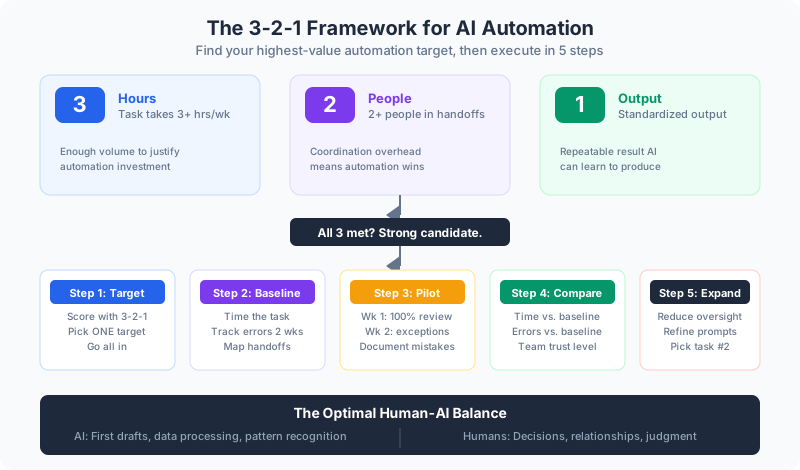
Before you touch any technology, you need to know where AI can actually move the needle. I use a simple filter called the 3-2-1 Framework:
- 3 Hours — The task consumes at least 3 hours per week across your team
- 2 People — At least 2 people are involved in handoffs or reviews
- 1 Output — The task produces a standardized, repeatable output
When all three conditions are met, you’ve got a strong automation candidate. When only one or two are met, you probably don’t — at least not yet.
👉 Tip: Walk through your team’s week hour by hour. Don’t ask “what takes the most time?” — ask “what do you do that feels like the same thing over and over?” That’s where the gold is.
Step 2: Pick One Target (Just One)
Here’s where most companies go wrong: they try to automate five things at once. Don’t. Pick the single highest-value target from your 3-2-1 scoring and go all in on that.
The five categories that consistently score highest for small businesses:
Customer Communication Drafts
Quote follow-ups, service confirmations, project updates, FAQ responses. AI is excellent at first drafts when it knows your voice and context. Always have humans review before sending — but you’re cutting 80% of the drafting time.
Data Entry and Extraction
Moving information between systems is one of the biggest time sinks in any operation. Extracting data from invoices, populating CRM fields from emails, categorizing documents, reconciling data across systems. This is grunt work that AI handles reliably.
Report Generation
Weekly and monthly reports consume more management time than most people realize. Pulling data from multiple sources, generating narrative summaries, highlighting anomalies. AI does the assembly; you do the analysis.
Meeting Documentation
Every meeting produces action items, decisions, and follow-ups that somebody has to capture. AI transcription plus summarization turns a 60-minute meeting into structured notes with action items and owners in minutes.
Process Documentation
Keeping SOPs current is the battle nobody wins manually. AI generates initial drafts from descriptions, updates docs based on changes, and creates training materials from procedures.
Benefits of starting with just one target:
- You learn the workflow without overwhelming your team
- You get a clean baseline to measure against
- You build confidence (or identify problems) before scaling
- Your team actually adopts it — instead of getting buried by five new tools at once
Step 3: Measure Your Baseline
This is the step everyone skips — and it’s why they can’t prove ROI later.
Before you automate anything, measure the current state:
- How long does the task take? Time it. Don’t guess.
- How many errors occur? Track them for two weeks.
- How many people touch it? Map the handoffs.
- What’s the fully loaded cost? Hours x loaded labor rate.
Write it down. You’ll need these numbers in 30 days to know whether AI actually helped.
Step 4: Run a Two-Week Pilot
Here’s how I tell clients to structure the pilot:
Week 1: AI does the work, humans review 100% of output. You’re learning what the AI gets right, what it gets wrong, and where your prompts need tuning.
Week 2: AI does the work, humans review output that falls outside confidence thresholds. You’re building trust and refining the process.
Keep full human oversight the entire time. Don’t reduce oversight until you have data showing the AI is reliable for your specific use case.
👉 Tip: Document every AI mistake during the pilot. Not to prove it doesn’t work — but to improve your prompts. Most “AI failures” are actually prompt failures. The mistake tells you what context you forgot to provide.
Step 5: Compare, Refine, Expand
At the end of two weeks, pull your numbers:
- Time comparison: How long does the task take now vs. baseline?
- Error comparison: Are errors up, down, or the same?
- Team feedback: Does the team trust the output? Where do they still feel they need to double-check?
If the numbers are good, start reducing oversight gradually. If they’re not, refine your prompts and run another week. Don’t expand to task #2 until task #1 is genuinely working.
The Human-AI Balance That Actually Works
The most successful AI implementations don’t replace people. They replace the worst parts of people’s jobs.
AI handles: First drafts. Data processing. Pattern recognition. Repetitive assembly work.
Humans handle: Final decisions. Relationship building. Exception handling. Quality judgment.
This isn’t a compromise — it’s the optimal setup. Your people are doing what they’re actually good at instead of spending half their week on assembly work that a machine does faster and more consistently.
What This Looks Like at 90 Days
If you follow these steps, here’s where you’ll be at 90 days:
- One automation running reliably with measured ROI
- A team that’s seen AI work in their actual workflow (not a demo)
- A clear picture of which process to automate next
- A baseline measurement framework you can reuse
The businesses winning with AI aren’t the ones with the biggest budgets. They’re the ones that started with one thing, measured it, and built from there.
Continue reading:
