
10 Claude Code Best Practices I Wish Someone Told Me on Day One
Ten practices that transformed Claude Code from a novelty into my primary productivity tool. Each one addresses a mistake I made so you don't have to.
I’ve been using Claude Code daily for months now. These ten practices are the ones that transformed it from “interesting toy” into the tool I reach for first on every project. Each addresses a mistake I made — or watched someone else make — so you can skip the learning curve.
The common thread across all ten: reduce ambiguity, maximize clarity, and automate what you can. Claude Code is powerful. These practices help you use that power consistently instead of sporadically.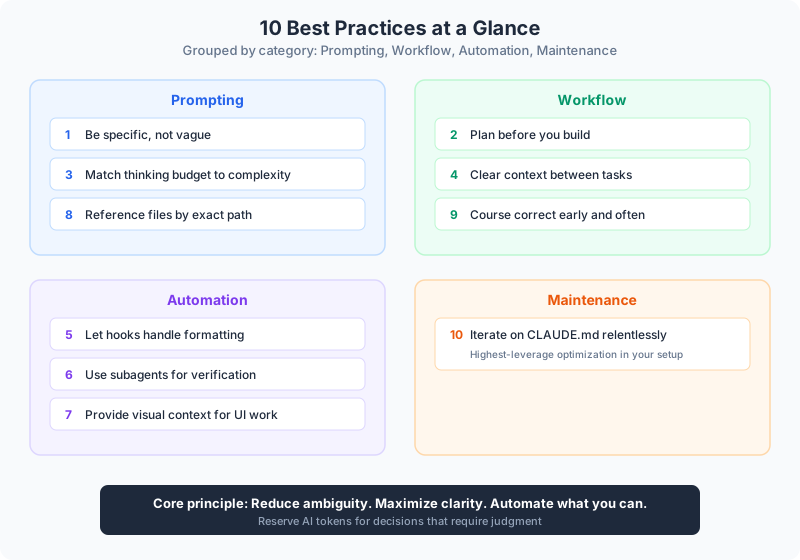
1. Be Specific, Not Vague
This is the single highest-leverage change you can make.
Bad: “Add tests”
Good: “Write unit tests for user authentication covering successful login, failed login with invalid password, and account lockout after 5 failures. Use Jest, avoid mocks, test against real database.”
Specificity eliminates guesswork. More context upfront means fewer iterations. I’ve seen people spend 30 minutes going back and forth on something that one specific prompt would have nailed in 60 seconds.
2. Plan Before You Build
Always use the explore, plan, build, commit pattern:
- “Read the auth module, don’t write code yet”
- “Think hard about the best approach, create a plan”
- “Implement the plan we discussed”
- “Create appropriate commits”
This prevents wasted effort from misunderstood requirements. It sounds slower, but it’s dramatically faster because you catch wrong directions before they become wrong implementations.
3. Match Thinking Budget to Complexity
Thinking budget keywords control how much reasoning Claude applies:
think— basic analysisthink hard— moderate complexitythink harder— significant complexityultrathink— maximum thoroughness
Simple tasks don’t need thinking time. Complex architectural decisions do. Matching the budget to the problem saves time on easy tasks and improves quality on hard ones.
4. Clear Context Between Tasks
Use /clear between unrelated tasks. Better to clear too often than too rarely.
Old context from a previous task actively confuses new ones. I used to try to keep sessions going for hours. Now I clear aggressively and get better results. Fresh starts produce better output than stale, crowded context windows.
5. Let Hooks Handle Formatting
Don’t waste instructions telling Claude how to format code. Configure hooks instead:
{
  "hooks": {
    "PostToolUse": [{
      "matcher": "Edit|Write",
      "hooks": [{"type": "command", "command": "prettier --write $CLAUDE_FILE_PATHS"}]
    }]
  }
}
Hooks are deterministic — they run every time, correctly, with zero tokens consumed. Instructions are hopeful — they work most of the time. Automate what you can, and save instruction budget for things that actually need judgment.
👉 Tip: Anything that has a binary right/wrong answer — formatting, linting, type checking — should be a hook, not an instruction. Reserve your CLAUDE.md instructions for decisions that require reasoning.
6. Use Subagents for Verification
Have one Claude write, another review:
- Claude #1 writes the implementation
/clearfor fresh context- Claude #2 reviews with fresh perspective
- Claude #3 makes fixes based on review
Fresh eyes catch what tired eyes miss — even artificial ones. This pattern catches bugs, inconsistencies, and missed edge cases that a single continuous session would sail right past.
7. Provide Visual Context for UI Work
For anything visual, provide screenshots:
- Design mocks to implement
- Current state for reference
- Expected output comparison
Paste images directly or reference file paths. Visual context eliminates ambiguity that text descriptions can’t resolve. “Make the button bigger” means something different to everyone. A screenshot of what you want is unambiguous.
8. Reference Files by Exact Path
Use: “Update src/config/database.ts to add connection pooling”
Not: “Update the database config”
Explicit references prevent wrong-file edits. Use tab-completion to get exact paths. This seems minor until Claude edits the wrong file and you spend 10 minutes figuring out what happened.
9. Course Correct Early and Often
- Press
Escapeto interrupt a direction you don’t like - Double-tap
Escapeto go back and retry - Ask for plans before implementation
Catching a mistake in progress is infinitely faster than fixing it after completion. Don’t let Claude run for three minutes in the wrong direction when you can see it going wrong in the first 15 seconds.
10. Iterate on Your CLAUDE.md Relentlessly
Treat it like prompt engineering:
- Add one guideline at a time
- Test if Claude follows it
- Remove what doesn’t work
- Add emphasis where needed (“IMPORTANT”, “NEVER”, “YOU MUST”)
Your CLAUDE.md affects every single session. Small improvements compound across every interaction. This is the highest-leverage optimization in your entire setup.
👉 Tip: Keep CLAUDE.md under 300 lines — 60 is ideal. Research shows LLMs reliably follow 150-200 instructions. Claude Code’s system prompt already uses ~50 of that budget. You’re working with the remainder, so make every line count.
Quick Reference
Essential Commands
| Command | Purpose |
|---|---|
/clear | Reset conversation |
/compact | Compress context, preserve decisions |
/resume | Continue previous session |
/rewind | Undo to previous checkpoint |
/project:name | Run project command |
Keyboard Shortcuts
| Shortcut | Action |
|---|---|
Escape | Interrupt current operation |
Escape Escape | Go back, retry different approach |
Shift+Tab | Toggle auto-accept mode |
# | Let Claude update files automatically |
Tab | File path completion |
CLI Flags
| Flag | Purpose |
|---|---|
-p "prompt" | Headless mode (no REPL) |
-c | Continue most recent session |
--model opus | Use Opus model |
--agent name | Use specific agent |
Continue reading:
- Claude Code from Zero to Dangerous: The Complete Guide — The full architecture, agents, skills, hooks, and workflows
- The 11 AI Primitives — Where Claude Code fits in the broader AI toolkit
- How to Write a Procedure — The same “be specific” principle applied to documenting any workflow
Related AI Articles
Claude Code: The Complete Guide (From Install to AI-Powered Workflows)
Everything you need to master Claude Code — install, architecture, agents, hooks, and the spec-driven workflow that changes how you build software.
Read moreThe Orchestration Economy: Only Thinking Remains
Execution is getting commoditized. The operators who win will be the ones who think deepest about what to automate next.
Read moreThe Handoff Document Pattern for Multi-Skill AI Workflows
Stop losing detail when AI workflows compact context. Use handoff documents to chain skills cleanly, preserving exact data between steps without summary loss.
Read moreMulti-Agent AI Framework: Spine Architecture in Python
A production-ready multi-agent AI framework in Python. Spine-based security, graph orchestration, and audit logging — not another toy demo.
Read more