
From Lead to Lease in Half the Time: An AI Workflow for Real Estate
A step-by-step walkthrough of how real estate teams use AI to cut lead response time, automate follow-up, streamline transactions, and reduce vacancy drag.
A buyer submits a contact form on your listing page. Pre-approved, relocating for work, needs to close in 45 days. The form hits an inbox. Your agent is in a showing. Two and a half hours pass before the reply goes out.
The buyer already signed with someone else. A competing brokerage called back in five minutes.
If you run a brokerage or property management company, this is happening to you right now. Not as one dramatic lost deal — as a slow leak of warm leads going cold while they wait for a human who’s busy doing something else.
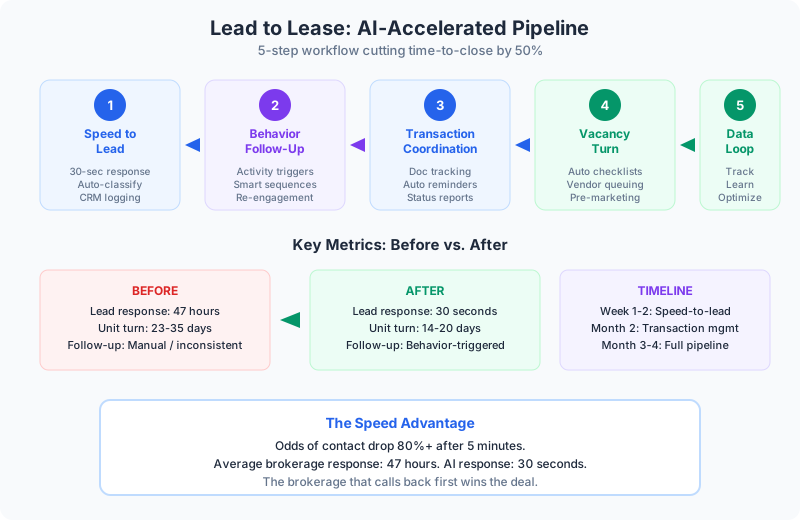
I’m going to walk you through, step by step, how to build an AI workflow that takes a lead from first contact to signed lease (or closed deal) in half the time your current process takes. No data science team required.
Step 1: Fix Speed-to-Lead
This is the single highest-ROI step. The data is brutal: odds of making contact drop by 80%+ if you wait longer than five minutes. Average brokerage follow-up time? 47 hours. That’s not a disadvantage — that’s forfeiting the deal.
What to build:
Set up an AI agent that monitors your lead intake channels — website forms, Zillow, Realtor.com, email inquiries. When a new lead comes in, the agent:
- Classifies by urgency and intent (active buyer vs. casual browser)
- Sends a personalized response within 30 seconds — not a generic “thanks for your interest” but a response that references the specific property and asks a relevant follow-up question
- Asks qualification questions — timeline, budget, pre-approval status, property type preferences
- Schedules a call with the right agent based on territory, specialty, and availability
- Logs everything in your CRM automatically
The agent gets a warm lead with full context instead of a cold contact to chase. That’s a fundamentally different starting point.
👉 Tip: Connect this to whatever CRM your team already uses — kvCORE, Follow Up Boss, BoomTown, whatever. If AI can’t write to your CRM, you’ve built a half-implementation that creates more work, not less.
Step 2: Build Intelligent Follow-Up Sequences
Speed-to-lead solves the first contact. But most deals don’t close on the first conversation. An agent managing 20-30 active prospects can’t touch all of them meaningfully every day. Follow-up becomes selective. The quiet buyer falls off the radar.
What to build:
Set up behavior-based follow-up sequences that trigger based on what the prospect does, not just time intervals:
- Prospect views three listings in the same neighborhood → agent gets notified with a curated list of similar properties
- Prospect opens the pre-approval email but doesn’t complete → follow-up with a simplified next step
- Prospect goes quiet for 7 days → re-engagement message with new listings matching their criteria
- Prospect responds to a market update → escalate to the agent for a personal call
The difference between time-based and behavior-based follow-up is the difference between “checking in” and “reaching out with something relevant.” One is noise. The other builds trust.
What this replaces: The sticky notes, the mental to-do lists, the “I meant to call them back” moments that silently kill deals every week.
Step 3: Streamline Transaction Coordination
Once you have a deal under contract, the operational challenge shifts from sales to logistics. Disclosures, inspections, title commitments, HOA docs, loan conditions — none of it is unpredictable. Yet in most brokerages, coordinating this flow still happens over email threads and individual heroics.
What to build:
A transaction tracking agent that monitors document flow:
- When a deal goes under contract, auto-generate the document checklist based on deal type (residential purchase, commercial lease, etc.)
- Track what’s been received and flag what’s missing — daily
- Send reminders to the responsible party when items are overdue
- Alert the transaction coordinator to exceptions — conflicts between documents, missing signatures, timely filing risks
- Produce weekly status summaries for agents and clients
The TC managing 8-10 deals simultaneously gets leverage they couldn’t otherwise have. They’re handling exceptions and keeping deals moving instead of manually tracking what’s in and what’s out.
👉 Tip: Start with the document tracking piece alone. Don’t try to automate the entire transaction workflow on day one. Just having real-time visibility into document status across all active deals is a massive improvement.
Step 4: Reduce Vacancy Drag (Property Management)
If you manage rental properties, vacancy is where money burns. Average multi-family turn: 23-35 days. A significant chunk of that isn’t construction or cleaning — it’s coordination lag.
What to build:
The moment a notice to vacate arrives, trigger the turn process:
- AI generates the turn checklist based on the unit’s maintenance history
- Schedules the move-out walk with appropriate lead time
- Queues vendor availability for cleaning, paint, carpet, and repairs
- Triggers the marketing push — listing updates, photos scheduled, showing availability posted
- Starts the applicant pipeline — pre-screening inquiries, document collection, scheduling tours
A coordinator managing 20 unit turns can manage 60 because the coordination layer is handled. Vacancy days drop. Revenue increases.
Benefits of the AI-assisted vacancy turn:
- Turn timeline drops from 23-35 days to 14-20 days
- Marketing starts before the unit is vacant — no gap between move-out and listing
- Vendor scheduling happens systematically, not through phone tag
- Application processing starts immediately when prospects inquire
- Less revenue lost to coordination lag
Step 5: Build the Feedback Loop
This is where most implementations stop — and where the best ones pull ahead. Every transaction generates data about what works. Which follow-up sequences convert? Which agents close fastest in which neighborhoods? Which vendor combinations produce the shortest turn times?
What to build:
A reporting layer that tracks:
- Lead-to-close time by source, agent, and property type
- Follow-up sequence conversion rates
- Document processing time by transaction type
- Vacancy turn days by unit type and vendor team
- Revenue per lead by channel
This isn’t a dashboard for dashboards’ sake. It’s the information you need to make operational decisions. If Zillow leads close at half the rate of referral leads but cost 3x more per acquisition, that changes your marketing spend. If one vendor team consistently turns units 5 days faster, that changes your vendor allocation.
Common Objections (And Why They’re Wrong)
“Our agents won’t use it.” If AI creates work — new logins, new data entry — they won’t. If it reduces work and shows up in systems they already use, adoption isn’t the issue.
“We tried automation before.” Most failures share a root cause: automating a step without fixing the surrounding process. If your lead routing is broken, automating the broken routing doesn’t help. Process design first, automation second.
“How do we know it’s compliant?” Build compliance in from the start. Communication logs, Fair Housing documentation, disclosure tracking. The AI implementation is actually where you harden the compliance process because everything gets logged consistently.
“We’re not big enough.” A 10-agent brokerage losing two deals a month to slow follow-up has the same math problem as a 100-agent brokerage losing twenty. The implementation is simpler at smaller scale. That’s a feature.
The Full Sequence
- Week 1-2: Speed-to-lead agent on your primary intake channels
- Week 3-4: Behavior-based follow-up sequences for active prospects
- Month 2: Transaction document tracking across active deals
- Month 3: Vacancy turn coordination (if applicable)
- Month 4: Feedback loop and reporting
Each step builds on the previous one. Don’t skip ahead. The brokerage that calls back in five minutes wins the deal. The property manager that turns units in 14 days instead of 30 captures the revenue. Start with step 1 and build from there.
Continue reading:
Related AI Articles
The AEC Firm's Guide to Recovering 30% of Lost Billable Hours
A practical how-to for architecture and engineering firms that want to stop losing billable capacity to proposals, RFIs, spec coordination, and reporting.
Read moreFinancial Advisors: Double Client Capacity, Same Staff
A guide for advisors and RIAs who want more clients without more staff — by cutting the admin that eats 40% of the week.
Read more5 Compliance-Safe AI Wins for Banks, RIAs, and Insurance Firms
Financial services firms think compliance blocks AI. It doesn't. Five automation wins that improve operations without regulatory risk.
Read moreWhy Your Law Firm's AI Strategy Is Probably Wrong
Most law firms focus AI on legal research. The real ROI is in billing, intake, calendaring, and compliance — the work that drains partner hours every day.
Read more