
Claude Code's 2-Level Memory System: Local + Global Learning
A practical framework for capturing learnings at local and global levels. Apply to software, marketing, finance, HR, legal, and any knowledge work.
Most AI workflows are amnesic. You solve the same problems repeatedly because nothing persists between sessions. Claude Code’s 2-level memory system fixes this—and the pattern works far beyond software development.
The Problem: Groundhog Day AI
Every new AI session starts from zero. The brilliant solution from last week? Gone. The edge case that burned you? Forgotten. The preference you painstakingly taught? Evaporated.
This isn’t just inefficient—it’s fundamentally broken for serious work.
The Solution: Local + Global Memory
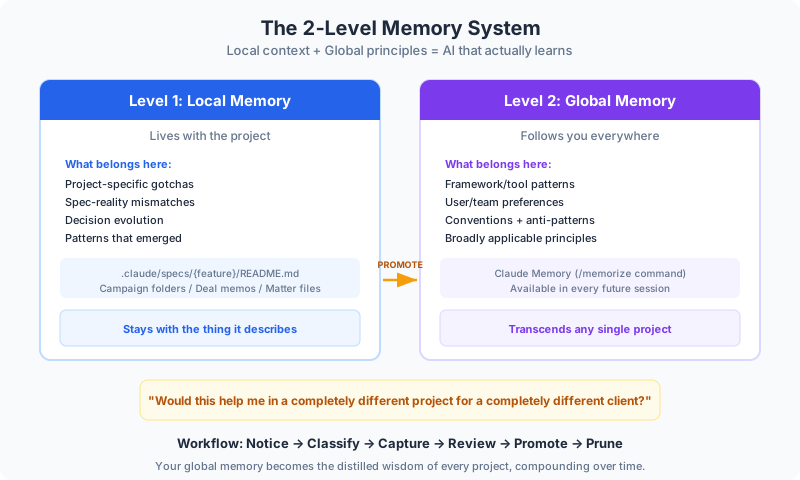
Claude Code separates learnings into two categories:
| Level | Scope | Persistence | Example |
|---|---|---|---|
| Local | Feature/project specific | Lives with the project | ”This API returns dates in ISO 8601” |
| Global | Broadly applicable | Follows you everywhere | ”Always validate external API responses” |
Not all learnings deserve permanent storage—but some absolutely do.
Level 1: Local Memory
Local memory captures context-specific knowledge that matters for this project but probably not others.
What Belongs in Local Memory
-
Gotchas specific to this codebase/project
- “The legacy payment module uses cents, not dollars”
- “Marketing prefers ‘customers’ over ‘users’ in copy”
-
Spec-reality mismatches
- “Planned 3 endpoints but needed 4 due to rate limits”
- “Budget spreadsheet format changed mid-project”
-
Decision evolution
- “Started with REST, switched to GraphQL for nested queries”
- “Initially separate campaigns, merged due to audience overlap”
-
Patterns that emerged
- “All data exports need admin approval workflow”
- “Legal requires 48-hour review on customer-facing changes”
Where Local Memory Lives
In Claude Code, local learnings live in a project spec folder:
.claude/specs/{feature}/README.mdThis extends to any domain:
| Domain | Local Memory Location |
|---|---|
| Software | Spec folder README |
| Marketing | Campaign folder notes |
| Finance | Deal/project memos |
| HR | Role-specific playbooks |
| Legal | Matter files |
| Sales | Account notes |
The key: local memory stays with the thing it describes.
Level 2: Global Memory
Global memory captures patterns that transcend any single project—learnings worth carrying forward forever.
What Belongs in Global Memory
-
Framework/tool patterns
- “React hooks can’t be called conditionally”
- “Excel XLOOKUP replaces VLOOKUP in all use cases”
-
User/team preferences
- “Prefer bullet points over paragraphs for executives”
- “Always include ‘so what?’ after data findings”
-
Conventions and anti-patterns
- “Never hardcode API keys”
- “Never send pricing without context”
-
Principles that apply broadly
- “Validate inputs at system boundaries”
- “Get legal sign-off before external commitments”
The Promotion Question
Before promoting a learning to global memory, ask:
“Would this help me in a completely different project for a completely different client?”
If yes, it’s global. If it’s only relevant to this context, keep it local.
Implementation in Claude Code
Claude Code supports this natively:
Local:  .claude/specs/{feature}/README.md
Global: Claude Memory (via /memorize command)
Local Capture Example
After completing a feature phase, add to the spec README:
## Learnings (Local)

### Gotchas
- Auth tokens expire after 15 minutes, not 1 hour as documented
- Rate limit is per-API-key, not per-user

### What Changed
- Added retry logic not in original spec
- Moved validation from frontend to API

### Patterns Worth Noting
- All user-facing errors need error codes for support
Global Promotion Example
At project completion, promote broadly applicable lessons:
/memorize "When integrating third-party APIs:
1. Always implement retry with exponential backoff
2. Never trust documented rate limits—test empirically
3. Log all external calls with correlation IDs"
These learnings now follow you to every future session.
The Automatic Extraction Superpower
What makes /memorize special: you don’t have to tell it what to remember.
When you run /memorize without explicit content, Claude reviews:
- Local learnings — Everything in your spec READMEs
- Chat history — The entire current session
It automatically extracts patterns that are broadly applicable, worth carrying forward, and distinct from what’s already in global memory.
/memorizeThat’s it. Claude scans the session, identifies what rose to “global principle” level, and stores it.
The difference:
- Manual: “Store this specific thing I’m telling you”
- Automatic: “Review everything and derive what matters globally”
The automatic approach catches insights you might forget to promote manually—debugging patterns across three attempts, user preferences adjusted mid-session, gotchas that burned you.
Beyond Software: Cross-Domain Applications
The 2-level pattern works for any knowledge work.
Marketing
Local (Campaign-specific):
- “This audience responds better to problem-aware copy”
- “LinkedIn outperformed Meta for this B2B launch”
- “Subject line A/B test: questions beat statements 2:1”
Global (Marketing principles):
- “Always test subject lines with 10% of list first”
- “B2B audiences prefer concrete numbers over vague claims”
- “Retargeting windows: 7 days for products, 30 days for services”
Finance & Analysis
Local (Deal/model-specific):
- “Client uses fiscal year starting April 1”
- “Historical data before 2020 uses old GL structure”
- “Model assumes 3% annual price increases per contract”
Global (Financial modeling principles):
- “Always build models with input cells separated from calculations”
- “Sensitivity tables: test +/- 20% on key assumptions”
- “Document all hardcoded assumptions in a separate tab”
HR & People Operations
Local (Role/hire-specific):
- “This role needs someone comfortable with ambiguity”
- “Candidate preferred async communication”
- “Team dynamic requires high conscientiousness”
Global (HR principles):
- “Structure interviews: same questions, same order, for fairness”
- “Reference checks: ask about failures, not just successes”
- “Culture fit doesn’t mean ‘like us’—it means ‘shares values‘“
Legal & Compliance
Local (Matter-specific):
- “Opposing counsel slow to respond—build in buffer”
- “Client risk tolerance: conservative on IP, aggressive on contracts”
- “Jurisdiction requires specific disclosure language”
Global (Legal principles):
- “Never give informal legal advice over email”
- “Document all client communications immediately”
- “When in doubt about privilege, assume it applies”
Data Science & Prediction
Local (Model/project-specific):
- “Feature X has data quality issues before 2022”
- “Seasonal adjustment needed for Q4 holiday effect”
- “Training data excludes COVID anomaly period”
Global (Data science principles):
- “Always hold out a true test set untouched until final evaluation”
- “Document all feature engineering transformations”
- “Correlation doesn’t imply causation—even when R-squared is high”
The Workflow
During Work
- Notice a learning — Something surprised you, burned you, or clicked
- Classify immediately — Is this local or global?
- Capture appropriately — Local goes in project notes, global gets flagged
At Phase/Project Completion
- Review local learnings — What accumulated in project notes?
- Identify promotion candidates — Which learnings transcend this project?
- Promote to global — Use
/memorize - Prune local — Remove what’s now captured globally
Over Time
Your global memory becomes a competitive advantage—the distilled wisdom of every project, available in every future session.
Why This Matters
Most people either:
- Capture nothing — Repeat the same mistakes endlessly
- Capture everything — Noise overwhelms signal, nothing is findable
The 2-level system is the middle path. Capture what matters, at the right level of abstraction, in a place you’ll actually find it.
The result: AI that actually learns. Sessions that build on each other. Compound returns on your knowledge investment.
Getting Started
- Set up your project structure — Create
.claude/specs/for local learnings - Configure global memory — Use
/memorizefor principles that transcend projects - Build the habit — End each work session with: “What did I learn?”
- Review quarterly — Prune outdated global memories, promote repeating patterns
The 2-level memory system isn’t just a Claude Code feature. It’s how you build workflows that compound in value over time.
Claude Code Series
This article is part of the Claude Code series:
- Claude Code Mastery: The Complete Guide — Comprehensive coverage of architecture, agents, skills, and workflows
- 10 Best Practices for Using Claude Code — Quick-reference practices for productivity
- Claude Code’s 2-Level Memory System — This article
Related AI Articles
The Handoff Document Pattern for Multi-Skill AI Workflows
Stop losing detail when AI workflows compact context. Use handoff documents to chain skills cleanly, preserving exact data between steps without summary loss.
Read moreProfessional Services Firms Think AI Doesn't Apply to Them. They're Wrong.
Service firms think AI can't help because their product is thinking. That's a myth. The hidden waste in admin, billing, and reporting is massive.
Read more10 Claude Code Best Practices I Wish Someone Told Me on Day One
Ten practices that transformed Claude Code from a novelty into my primary productivity tool. Each one addresses a mistake I made so you don't have to.
Read moreClaude Code: The Complete Guide (From Install to AI-Powered Workflows)
Everything you need to master Claude Code — install, architecture, agents, hooks, and the spec-driven workflow that changes how you build software.
Read more