
The Real Cost of Manual Procurement (And How AI Fixes It)
Manual procurement burns buyer time on data entry while strategic decisions get ignored. Here's what it costs and how AI fixes it.
I spent years in procurement operations before I ever touched AI. So I can tell you from experience: most procurement teams aren’t doing procurement. They’re doing data entry.
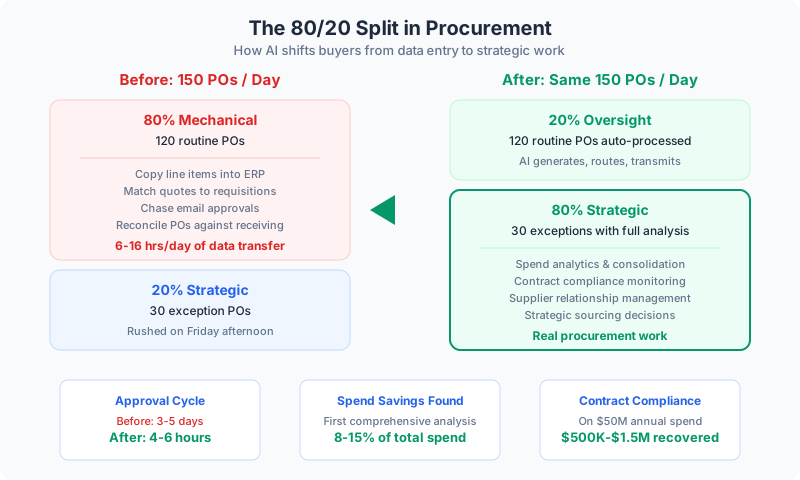
A mid-market team processing 150 purchase orders a day spends roughly 6 hours of collective human time copying line items into the ERP, matching supplier quotes, chasing approvals through email chains, and reconciling PO numbers against receiving documents that show up as PDFs, spreadsheets, and occasionally handwritten faxes.
Of those 150 POs, about 120 are routine — standard items from approved vendors at contracted prices. The buyer isn’t making decisions. She’s transcribing data between systems. The other 30 require actual judgment: new supplier bids, spec changes, price increases, sole-source situations.
That’s the 80/20 problem in procurement: most teams spend all day on the 80% that’s mechanical and handle the strategic 20% on Friday afternoon, rushed, without the analysis the decision deserves.The Problem: Death by Data Entry
Let me walk through what a typical PO lifecycle looks like at a $100M company:
- Department head submits a requisition
- Procurement validates against budget codes and vendor lists
- Buyer converts to PO, adds line items, verifies pricing
- Routes for approval, sends to supplier, logs in ERP
Each step takes 3-8 minutes for a routine order. At 120 routine POs per day, that’s 6-16 hours of manual processing — two to three full-time buyers doing nothing but data transfer.
Then there’s the approval bottleneck. The average PO approval cycle at a mid-market company runs 3-5 days. Not because the decision takes that long — most approvers spend 30 seconds before clicking approve. The delay is queue time. The PO sits behind 47 other emails.
And while routine $200 office supply reorders wait in that same queue, the $85,000 equipment purchase from an unknown vendor gets the same 30-second review. That’s not risk management. That’s a system that treats everything identically because nobody has time to differentiate.
The Solution: AI on the Split
The fix isn’t hiring more buyers. It’s splitting the work.
Routine POs: Automate the 80%
AI triages every incoming requisition: routine reorder at contracted prices, or exception requiring buyer judgment.
Routine orders flow through automated PO generation. The system already knows the vendor, price, GL code, approval path, and delivery terms. The PO is created, routed, and transmitted without a buyer touching it.
Three buyers handling 150 POs (50 each) shift to handling 30 exception POs (10 each) — with time and bandwidth to actually analyze what they’re buying.
Approvals: From 4 Days to 4 Hours
For routine orders meeting all policy criteria — approved vendor, contracted pricing, within budget and authority — implement auto-approval with notification. The approver gets informed, not asked. If they see an issue, they intervene. The default is motion, not stasis.
For everything else, AI provides context with the approval request:
“PO #4471 for $3,200 in maintenance supplies from Allied Industrial is awaiting your approval. Routine reorder at contracted pricing, matching the previous 6 orders.”
That turns an approval from a research task into a confirmation task. Approval cycles compress from 4+ days to 4-6 hours. That translates directly to earlier deliveries, fewer rush charges, and less production time lost waiting for materials.
👉 Tip: Start by measuring your current approval cycle time — most procurement teams don’t actually know this number. It’s almost always worse than they think.
Spend Analytics: The Intelligence Layer
Every procurement organization has years of purchasing data sitting in their ERP. Invoice history, vendor performance, price trends, category breakdowns. Most of it gets exported to Excel once a quarter for a board presentation, then ignored.
AI running against that historical spend data catches what no quarterly Excel review would:
- Spend fragmentation — same category purchased from 14 suppliers at 14 price points because three departments buy independently
- Price drift — a contracted $12.40/unit that quietly became $13.10 through invoice-level adjustments below the variance threshold
- Maverick spend — purchases bypassing procurement entirely via expense reports or P-cards
A $200M company typically finds 8-15% savings opportunity in its first comprehensive spend analysis. Not theoretical — actual dollars wasted through fragmentation, drift, and bypass.
Benefits of AI-driven procurement:
- Buyers shift from 80% clerical / 20% strategic to 20% oversight / 80% strategic
- Approval cycles compress from days to hours
- Spend visibility goes from quarterly snapshots to real-time intelligence
- Contract compliance monitoring catches pricing errors before invoices get paid
- Volume rebate thresholds get tracked automatically — no more leaving money on the table
Contract Compliance: Money You’re Already Owed
This is one of my favorite areas because the ROI is so tangible. A team managing 200 active supplier contracts has a compliance problem it probably doesn’t know about:
- Volume rebates not claimed because nobody tracked cumulative spend against the threshold
- Early payment discounts expired because AP didn’t process invoices in time
- Price protection clauses unenforced when the supplier raised prices
AI watches every invoice against every applicable contract term. Supplier invoices at $14.20/unit when the contract says $13.80? Flagged before AP processes payment. Cumulative spend reaches 90% of the rebate threshold? The buyer gets notified with specific guidance.
Contract compliance monitoring on $50M annual spend typically recovers 1-3% in year one — $500K to $1.5M that was leaking through pricing errors, missed rebates, and unexercised terms.
👉 Tip: Pull your top 20 supplier contracts and check the last 12 months of invoices against contracted pricing. I’d bet you find at least one supplier that’s been quietly billing above contract for months.
What the Team Looks Like After
Here’s the part that matters. The headcount doesn’t change. The output does.
- The buyer who spent Monday morning processing 50 routine POs now reviews spend analytics, identifies a $180K consolidation opportunity, and builds the business case
- The procurement manager who spent every quarter pulling scorecard data now manages by exception — the system flags the three suppliers who need attention this week
- The CPO who presented annual spend data now presents real-time spend intelligence — what’s happening now, what’s projected next quarter, and what strategic moves the team is making
The team shifts from order processing to actual procurement. That’s the transformation.
Where to Start
The highest-leverage starting point is PO processing automation for routine orders. It’s the largest time sink, the most clearly defined workflow, and the improvement is immediately measurable.
Start by classifying incoming requisitions as routine or exception. Build automation for routine POs first — the 80% that don’t require judgment. Your buyers will see the difference in their first week.
From there, add spend analytics. The data is already in your ERP. The question is whether anyone is looking at it systematically instead of quarterly.
Continue reading:
Related AI Articles
The AEC Firm's Guide to Recovering 30% of Lost Billable Hours
A practical how-to for architecture and engineering firms that want to stop losing billable capacity to proposals, RFIs, spec coordination, and reporting.
Read moreFinancial Advisors: Double Client Capacity, Same Staff
A guide for advisors and RIAs who want more clients without more staff — by cutting the admin that eats 40% of the week.
Read more5 Compliance-Safe AI Wins for Banks, RIAs, and Insurance Firms
Financial services firms think compliance blocks AI. It doesn't. Five automation wins that improve operations without regulatory risk.
Read moreWhy Your Law Firm's AI Strategy Is Probably Wrong
Most law firms focus AI on legal research. The real ROI is in billing, intake, calendaring, and compliance — the work that drains partner hours every day.
Read more