
The Cobbler's Children: Why Tech Companies Run Internal Ops on Spreadsheets
Tech companies build AI for customers but run internal ops on spreadsheets and Slack. Here's where that gap costs real money and how to close it.
I’ve seen this pattern so many times it stopped being funny. A 200-person SaaS company in Austin sells an AI-powered analytics platform. Their marketing page says “automate your data workflows.” Their customer success team tracks renewal risk in a shared Google Sheet. Their support team manually triages 160 tickets per day. Their PM reads through Jira comments for 45 minutes to run a sprint retro.
The cobbler’s children have no shoes. And in tech, the cobbler’s children are running on spreadsheets and Slack threads — the exact patchwork they’d never let their customers get away with.
The irony isn’t lost on the ops team. They just haven’t had time to fix it.
The Problem: Internal Ops as an Afterthought
Tech companies pour engineering resources into the product and leave internal operations to duct tape. It makes sense from a prioritization standpoint — product is revenue. But the hidden cost adds up.
The gap between how tech companies serve their customers and how they serve their own operations is the single biggest efficiency leak in the industry.Here’s where I see it most:
Support ticket triage. A B2B SaaS company with 800 customers generates 120-180 tickets per day. Each one arrives as unstructured text. A senior support agent reads each ticket, classifies it, assigns priority, and routes it. That’s 2-4 minutes per ticket — 5-10 hours per day of a senior person’s time on classification decisions and dropdown menus.
Customer health monitoring. Six CSMs, each managing 130 accounts, spending 15-20 minutes per account on monthly reviews — checking usage, tickets, billing changes. An entire work week per CSM consumed by data gathering, leaving minimal time for proactive outreach.
Knowledge base decay. Every SaaS company has a knowledge base. Every knowledge base is partially wrong. Articles written for v2.3 describe workflows that changed in v3.0. Support agents memorize the corrections. New agents follow the articles literally and create follow-up tickets.
Incident response. Engineer wakes up to a PagerDuty alert at 2:47 AM. Spends 45 minutes reading changelogs and dashboards to diagnose a problem AI could have correlated in seconds.
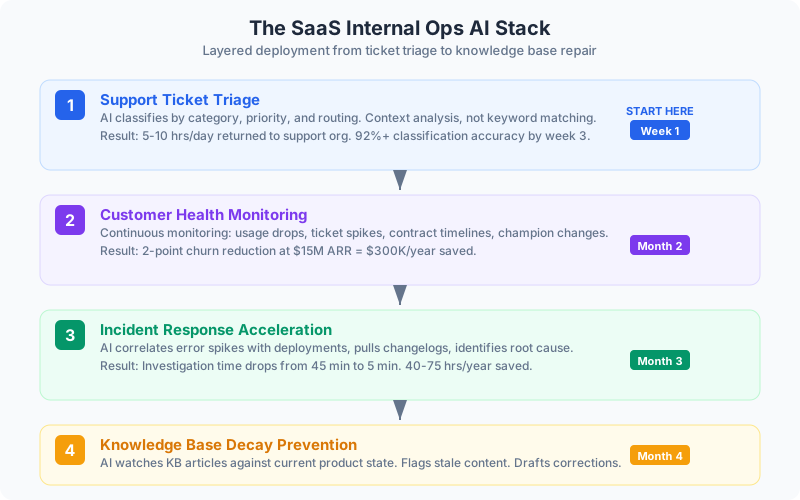
The Solution: Start with the Ticket Queue
If I could only tell a SaaS ops team one thing, it’d be this: start with support ticket triage. It’s the highest-volume repetitive workflow, the data is structured enough to classify, and improvement shows up in two weeks — not two quarters.
How It Works
AI classifies tickets by category, priority, and routing — not keyword matching (which fails when a customer says “it’s broken” without using the word “bug”), but content and context analysis.
Examples of why keyword matching fails and AI doesn’t:
- “Our dashboard hasn’t updated since yesterday morning” — that’s a bug, not a feature request, despite zero technical language
- “We need to add 15 users but the admin panel only shows 10 seats” — billing/access hybrid, routes to account team
- “Is there a way to export the raw data behind the weekly report?” — feature request if it doesn’t exist, documentation issue if it does, upsell signal either way
The support lead reviews automated assignments for two weeks, corrects errors, and the system learns. By week three, classification accuracy typically exceeds 92%.
Benefits of AI-powered ticket triage:
- 5-10 hours per day returned to the support org
- Senior agents work complex escalations that actually need their expertise
- Routing accuracy improves — the right person sees the ticket first
- Response time drops because tickets don’t sit in a triage queue
- You generate clean classification data that feeds every downstream analysis
👉 Tip: Don’t try to automate ticket resolution first. Start with classification and routing only. Let the humans keep solving the problems — just make sure the right human sees the right problem immediately.
Layer Two: Customer Health Monitoring
Once triage is running, add continuous customer health monitoring. Your product analytics data is already being collected. The question is whether anyone’s watching it systematically across all 800 accounts.
AI watches product usage, support volume and sentiment, billing changes, login frequency, feature adoption, and contract timelines for every account daily. Not monthly.
Signals it catches before the monthly review would:
- Weekly active users dropped 30% over two weeks
- Four support tickets in three days after averaging one per month
- Contract renews in 90 days and the champion just changed roles
A CSM who knows which 12 accounts need attention this week has fundamentally different conversations. She calls because she knows usage dropped, not because it’s the monthly check-in. The customer feels monitored and valued instead of processed.
At $15M ARR with 12% annual churn, reducing churn by 2 points saves $300K per year. One saved enterprise account pays for the entire implementation.
The Incident Response Multiplier
For engineering teams: AI-assisted incident diagnosis drops investigation time from 45 minutes to 5. The system correlates error rate spikes with recent deployments, identifies the specific change, and pulls relevant changelogs — all before the on-call engineer finishes reading the alert.
A 200-person engineering org with 80-150 production incidents per year saves 40-75 hours of investigation time. More importantly, 40-75 fewer incidents have extended resolution times because a human was still diagnosing while customers were still suffering.
👉 Tip: If your eng team already uses structured deployment logs and error monitoring, you’re 80% of the way to AI-assisted diagnosis. The data pipeline already exists — you just need to connect the correlation layer.
The Knowledge Problem That Compounds
Here’s one most tech companies ignore until it becomes a crisis: knowledge base decay.
Support agents know which articles are stale. They’ve memorized the corrections. When a new agent follows the article literally, the customer gets bad instructions and opens a follow-up ticket. Every outdated article that sends a customer down the wrong path generates a ticket that shouldn’t exist.
AI watches every KB article against the current product state. Feature gets modified? Flagged. Support ticket references an article and requires correction? Flagged. Screenshot URL no longer resolves? Flagged. And it produces targeted update drafts — not speculative rewrites, but specific corrections.
A support team with 200 KB articles where 30% are stale is deflecting fewer tickets than it should. Fix the knowledge base and you reduce ticket volume at the source.
Your Company Builds Products That Help Others Operate Smarter
It’s time to run that way internally. Start with the ticket queue. Layer in customer health monitoring. Fix the knowledge base. Then use the same discipline you bring to product development — measure, iterate, compound.
The ops team has known this for years. They’ve just been waiting for someone to prioritize it.
Continue reading:
- AI for Small Business Operations — The speed advantage that applies to SaaS companies under $20M
- The 11 AI Primitives — The building blocks that map to support triage, monitoring, and classification
- Technology Isn’t a Strategy — Why internal tooling without workflow design doesn’t work
- Stop Over-Engineering: How Perfect Systems Kill Business — Why starting simple with ticket triage beats building a grand AI platform
Related AI Articles
The AEC Firm's Guide to Recovering 30% of Lost Billable Hours
A practical how-to for architecture and engineering firms that want to stop losing billable capacity to proposals, RFIs, spec coordination, and reporting.
Read moreThe Real Money in Your Dental Practice Isn't in the Chair
Most dental AI marketing focuses on imaging and diagnostics. That's not what's killing your margins. Here's what is — and how to fix it.
Read moreFinancial Advisors: Double Client Capacity, Same Staff
A guide for advisors and RIAs who want more clients without more staff — by cutting the admin that eats 40% of the week.
Read more5 Compliance-Safe AI Wins for Banks, RIAs, and Insurance Firms
Financial services firms think compliance blocks AI. It doesn't. Five automation wins that improve operations without regulatory risk.
Read more