
The Federal Contractor's Guide to AI Without Losing Your Clearance
A practical guide for government contractors who want to implement AI without blowing up their CMMC posture, CUI handling, or security clearances.
Every piece of AI advice on the internet assumes you can just sign up for a SaaS tool by Friday. If you’re a government contractor, you know how absurd that sounds. Your IT review takes six weeks. Legal has to sign off. The FSO has questions. And somewhere in the back of your mind, you’re wondering whether pasting contract data into a commercial AI tool just created a CUI spillage incident.
Here’s the thing — AI absolutely works in federal contracting environments. But the implementation path is different from what the tech blogs describe. You need a guide that respects the constraints you actually operate under.
That’s what this is.
Step 1: Understand What Makes Your Environment Different
Before you deploy anything, you need to be honest about the constraints. They’re real, and ignoring them isn’t an option.
CMMC changes what you can deploy. Level 2 and above governs how you handle Controlled Unclassified Information — not just document classification, but the entire information system your employees touch. A commercial AI tool sending data to a third-party cloud model can put your CMMC posture at risk.
CUI handling isn’t optional. Most contractors handle CUI daily without thinking about it — PII, technical data with distribution statements, acquisition-sensitive information. When you pipe that into AI tools, you need a clear CUI handling policy baked into the workflow, not bolted on afterward.
Cleared environments add another layer. If your work touches classified systems, the immediate question is: what can you run in your unclassified-but-controlled environment without creating spillage risk?
Procurement overhead compounds everything. A commercial company tries a new tool by Friday. You might spend six weeks getting a SaaS through IT review, legal review, and FSO sign-off.
👉 Tip: None of this means you can’t use AI. It means you start with content that doesn’t trigger any of these constraints — and there’s a lot of it.
Step 2: Map Your Non-Sensitive Work (It’s Bigger Than You Think)
The fastest path to AI value in government contracting is deploying against work that has zero CUI concerns — and that category is much larger than most contractors realize.I call this the invisible factory — the administrative overhead underneath every task order that consumes resources without directly creating contract value. In government contracting, it looks like:
- Recurring data calls requiring the same information pulled from five spreadsheets
- Proposal sections rebuilt from scratch every bid cycle because nobody captured the last version
- CDRL preparation requiring reformatting technical content into government-specified templates
- Contract deliverable tracking spread across email, shared drives, and calendar reminders
- Labor category mapping and compliance reporting done manually every period
None of this requires clearances to automate. Most of it doesn’t touch CUI. It’s just tedious, time-consuming, and done inconsistently because your people are smart enough to do harder things.
Benefits of starting with non-sensitive work first:
- Zero FSO involvement required
- No ISSO review needed
- Immediate time savings on administrative overhead
- Builds organizational confidence before tackling controlled content
- Creates a track record for leadership buy-in on later phases
Step 3: Ask the 5 Questions Before Every Deployment
These aren’t compliance checkboxes. They’re operational clarifying questions that shape the whole implementation.
Question 1: What data does this touch?
Map the inputs. Is it CUI? Sensitive but unclassified? Proprietary to a prime? Most problems come from not knowing the answer until something goes wrong.
Question 2: Where does the data go?
Commercial AI tools send input to vendor-hosted models. For public bid data and non-sensitive proposals, probably fine. For CUI or acquisition-sensitive information, it’s not. Know whether you need on-premises, FedRAMP-authorized cloud, or commercial tools used only with non-controlled content.
Question 3: Who authorized this?
In a cleared environment, someone owns the AI deployment decision — FSO, ISSO, program manager, COR. One or more need to be in the loop before deployment. Federated autonomy on tool selection is a security risk here.
Question 4: What’s the failure mode?
AI makes mistakes. In government contracting, errors in deliverables can trigger cure notices or create past performance risk. The human review step isn’t optional — it needs to be designed in.
Question 5: What does success look like in 90 days?
Pick a metric: hours saved on data calls, reduction in proposal development time, improved CDRL accuracy. Define it before you start.
👉 Tip: Print these five questions and hand them to anyone who suggests an AI tool. If they can’t answer all five for their proposed use case, the deployment isn’t ready.
Step 4: Match Your Deployment Tier to Your Content Type
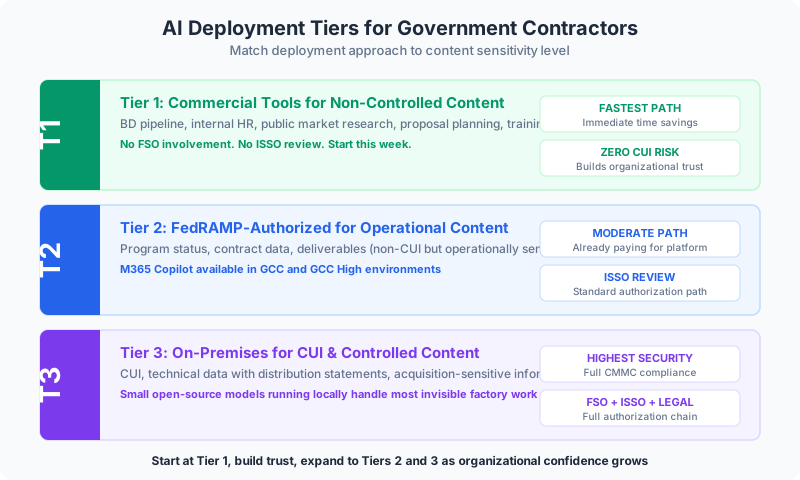
Here’s the practical framework. Three tiers, three content types, three deployment approaches.
Tier 1: Commercial Tools for Non-Controlled Content
Use cases: BD pipeline management, internal HR processes, public market research, proposal planning (not writing — planning), training and onboarding documentation.
This is the fastest path. No FSO involvement, no ISSO review. You can start this week.
Tier 2: FedRAMP-Authorized Tools for Operational Content
Use cases: program status, contract data, deliverables that aren’t CUI but are operationally sensitive.
Microsoft 365 Copilot is available in GCC and GCC High environments. The pitch to leadership: you’re already paying for the platform. The AI features are an upgrade to how you use it.
Tier 3: On-Premises for CUI and Controlled Content
Use cases: anything touching CUI, technical data with distribution statements, acquisition-sensitive information.
Small open-source models running locally are genuinely capable for many contractor use cases — document extraction, template completion, classification, summarization. Most invisible factory work doesn’t require cutting-edge reasoning. It requires consistent execution of well-defined tasks.
Step 5: Build Toward Institutional Knowledge Capture
The highest-value, lowest-risk application for most government contractors is institutional knowledge capture and retrieval.
Think about every proposal cycle. The team rebuilds price-to-win models from scratch because the analyst who built the last one left in January. Past performance write-ups live in a shared drive nobody’s audited in two years. Lessons learned exist but aren’t findable when you need them.
A simple retrieval system — your past content with a semantic search layer — returns value every time a proposal team starts a new bid. It doesn’t require CUI authorization or classified systems. It directly reduces proposal development time and kills the “we’ve done this before but can’t find it” problem.
For most government contractors, this is the first project worth doing.
Step 6: Use AI to Improve Your Compliance Posture
Here’s the part most FSOs miss — AI can improve your compliance posture, not just threaten it.
Recurring compliance failures in government contracting are usually process failures:
- CDRLs missed because nobody tracked due dates
- Invoices submitted with missing documentation
- Subcontractor consent requests forgotten in email threads
AI that monitors deliverable schedules, maintains audit trails, enforces checklists, and surfaces exceptions before they become findings isn’t a compliance risk. It’s compliance infrastructure.
The contractors who win over the next decade will build more overhead efficiency into their indirect rate structure, execute proposals faster at higher quality, and retain institutional knowledge regardless of attrition. AI is the tool for all three — but only if implemented with the same rigor you bring to your contracts.
Continue reading:
Related AI Articles
The AEC Firm's Guide to Recovering 30% of Lost Billable Hours
A practical how-to for architecture and engineering firms that want to stop losing billable capacity to proposals, RFIs, spec coordination, and reporting.
Read moreWhat Your Senior Accountants Wish You Knew About AI
Most AI-for-accounting pitches miss the point. Here's what matters and the myths keeping firms from recovering senior capacity.
Read moreHow a Mid-Size GC Cut Bid Prep Time by 60% Without Adding Estimators
How one general contractor used AI to fix estimating bottlenecks, catch cost overruns weeks earlier, and stop losing tribal knowledge to turnover.
Read moreStop Firefighting Ecommerce: Let AI Run the Boring Ops
A framework for ecommerce operators tired of stockout alerts, ad spend blowouts, and unresolved tickets. Hand the pattern recognition to AI.
Read more